Which AI marketing tool should an indie founder start with?
The best AI marketing tools for indie founders solve different problems. Start with Claude for drafts, HollerScout for finding promotion opportunities, F5Bot for monitored community discussions, Canva for visuals, Buffer for social publishing, MailerLite for subscriber email, or Microsoft Clarity for website behavior. Choose the bottleneck, not the whole list.
This shortlist targets founders' customer-finding and publishing jobs; specialist SEO, ad-buying, and video platforms are left out on purpose.
Disclosure: HollerScout publishes this guide and is one of the included tools. Numbering is for navigation, not an overall performance ranking.
| Tool / best fit | Actual AI task | Entry price and AI access | Tracking scope | Main limitation |
|---|---|---|---|---|
| Claude: drafts | Write, edit, research with context | Free; Pro $20/month billed monthly | Not an outreach system of record by default | Verify claims and links |
| HollerScout: weekly discovery | Research and rank opportunities; draft outreach | $19/month for one product; $3 seven-day trial; no free tier | Manually marked opportunity status | Does not send or monitor replies |
| F5Bot: community alerts | Filter selected discussions by topic or intent | AI on Gold: $49.99/month, including $10 monthly token usage; overages possible. Free is personal-use, non-AI | Matched discussions | AI coverage requires configuration |
| Canva: visual assets | Generate design starting points, images, and text | Free with limited AI access; paid upgrades | Asset creation, not outreach outcomes | Review accuracy and permissions |
| Buffer: social publishing | Rewrite and repurpose posts | Free includes AI Assistant and up to three channels | Supported social-channel performance | Reports vary by channel and plan |
| MailerLite: subscriber email | Generate and refine email text | Free: 250 subscribers, 2,500 monthly sends; writer requires paid Comfort or Power | Campaign reporting | Not cold outreach to discovered contacts |
| Microsoft Clarity: website behavior | Summarize patterns; chat with collected data | Core behavior analytics and AI summaries are free | On-site behavior | Not complete revenue attribution |
These are tools with useful AI features. Scheduling, email triggers, and heatmaps are not automatically AI themselves.
Prices are USD, with applicable taxes and usage charges extra. Check the linked plan pages before buying.
Mention-finding, opportunity discovery, and tracking are different jobs
A new product may have few brand mentions but plenty of relevant conversations. That makes the distinction important:
- Mention-finding locates pages or posts containing a brand, competitor, or chosen term. Brand mention monitoring answers where that name appeared, not every place buyers need help.
- Opportunity discovery finds places where a contribution or pitch might fit even when the brand is absent. Examples include an alternatives discussion or a comparison article that omits the product.
- Outreach drafting turns that specific context into a proposed message. A draft is neither permission to participate nor a sent message.
The discovery tools overlap. F5Bot offers keyword alerts plus paid semantic filters for relevant intent or topics on selected sources. HollerScout describes broader weekly research across search results, articles, and communities, with suggested actions. Neither approach proves that a suggestion is worthwhile.
Tracking also has three separate meanings:
- Action status: checked, skipped, drafted, or sent.
- Outreach outcome: reply received or placement confirmed.
- Business result: visits, sign-ups, or purchases.
A completed task is not a customer acquired. Keep those records separate, even when a tool calls all of them “tracking.”
1. Claude: best for turning product context into drafts
Best fit: A founder who knows the audience or opportunity but needs help with positioning, landing-page copy, an announcement, or a short pitch.
Actual AI task: Claude supports first drafts and editing, works with supplied documents and text, organizes context in projects, and can search the web. That makes it useful beyond blank-page copywriting.
Suggested founder use: Supply verified product facts, the intended reader, an actual page or thread excerpt, constraints, and a sample of the founder's voice. Ask for a brief draft that contributes something useful and discloses the maker relationship. Providing the actual context is more useful than asking for “a persuasive outreach email.”
Price and AI access: The Free plan is available, while Pro costs $20/month billed monthly, before applicable tax. Paid access still has usage limits.
Limitation: Verify factual claims and links, and avoid uploading sensitive customer information unnecessarily. Use a draft-only workflow without send permissions. Connections to external tools can change what Claude is authorized to do.
Tracking scope: A chat response is not automatically a recurring opportunity queue or outreach ledger. Keep dates, sent messages, and outcomes in a separate record unless a specific connected workflow handles them.
Skip it when: An assistant already in the stack handles this writing job well enough. A second writing subscription needs a reason beyond different wording.
2. HollerScout: best for a weekly shortlist of promotion opportunities
Best fit: Digital-product founders who can edit a message but struggle to decide which articles, websites, and conversations deserve attention.
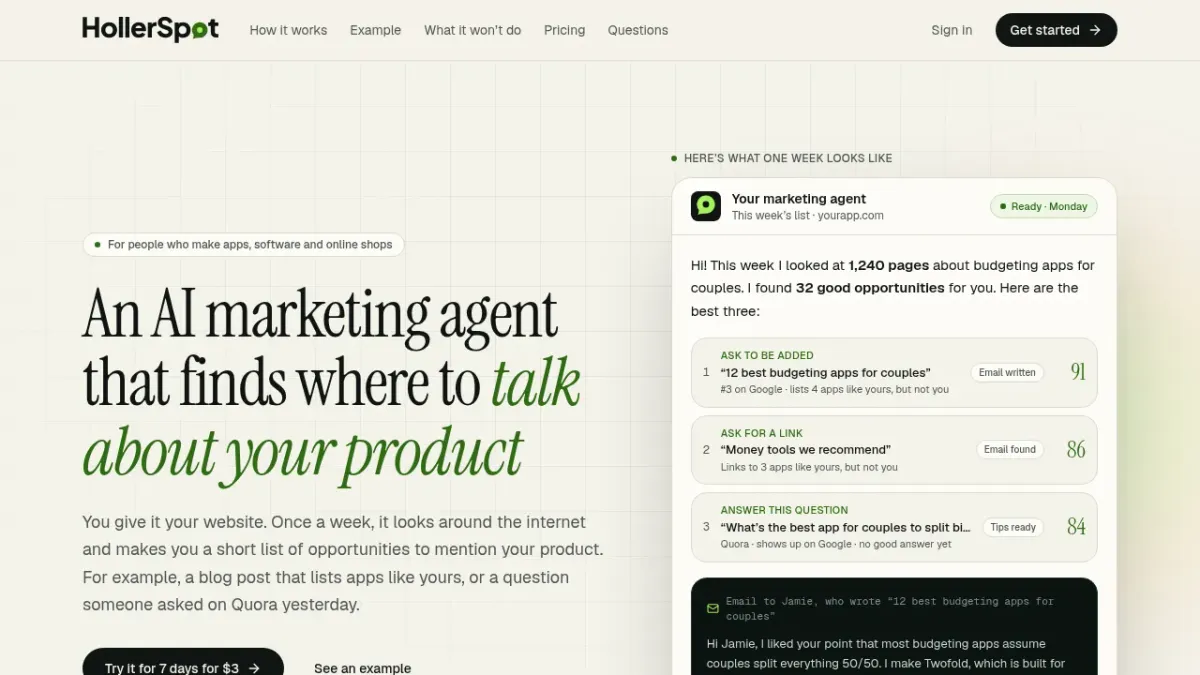
Actual AI task: HollerScout describes weekly research that starts with the founder's website and produces ranked, linked opportunities. These can include comparison lists to pitch, unlinked mentions, questions to answer, and pages to create. It supplies email drafts or reply guidance for human review.
Its relevance scores are its own prioritization output, not independent ratings or verified probabilities of getting a customer. The links let founders inspect suggestions; they do not prove audience fit or likely conversion.
Suggested founder use: Pick a relevant opportunity, read the original page, and decide whether a contribution would help its readers. Edit the proposed message, check community rules, and disclose the maker relationship. The founder sends or posts everything. HollerScout says it never posts, comments, messages, likes, or votes.
Price and AI access: $19/month for one product includes four scans and 20 drafted emails/replies per month. There is no free tier; the seven-day trial costs $3. Applicable tax is added at checkout. See the example and trial details.
Limitation: Weekly batches are not continuous mention alerts. The public budgeting-app example is fictional, not a tested result.
Tracking scope: HollerScout remembers opportunities manually marked done or not useful. That is not reply monitoring, placement confirmation, an automatic backlink re-check, or customer-acquisition reporting.
Skip it when: The priority is cold-email sequences, real-time listening, or automatically measuring outreach results rather than finding places worth considering.
HollerScout's fictional budgeting-app example illustrates linked opportunities and suggested actions; it is not a tested result.
3. F5Bot: best for monitored community mentions and intent alerts
Best fit: Founders whose buyers discuss problems on Reddit, Hacker News, or Lobsters and who want alerts rather than a weekly cross-web brief.
Actual AI task: Keyword monitoring looks for selected names or phrases. F5Bot's AI filtering evaluates a natural-language description of a topic or intent, so it can find relevant conversations without a brand-name match.
Content reaches a filter through direct monitoring of selected sites and content types, or through keyword matches routed to it. Direct Reddit monitoring requires specified subreddits. This is not semantic monitoring of the entire web or every subreddit.
Suggested founder use: An example filter could seek people asking for alternatives to a named product category while excluding hiring posts and self-promotion. Refine the description when alerts are irrelevant. Read each original thread before deciding whether to reply.
Price and AI access: The Free tier is labeled personal use only and has no AI filtering. Silver costs $9.99/month and is also non-AI monitoring. Gold starts at $49.99/month billed monthly with AI filtering, including the first $10 of monthly token usage. Additional token charges are possible.
Limitation: Source selection and filter wording shape what reaches the inbox. An alert is not a recommendation to promote.
Tracking scope: Matched discussions and alert history, not whether a pitch was sent, a reply arrived, or a customer signed up. Use another tool for drafting.
Skip it when: Those communities are not where buyers spend time, or intent filtering is not worth the Gold subscription and potential usage charges.
4. Canva: best for editable marketing visuals
Best fit: Founders making product announcements, social graphics, simple flyers, or supporting visuals without a designer.
Actual AI task: Canva's available-now AI tools include prompt-based templates, image generation, AI photo editing, and Magic Write. Treat them as ways to create an editable starting point, not a finished brand asset.
Suggested founder use: Turn one verified product benefit and a real screenshot into an announcement graphic. Edit the layout and headline, then inspect image details and product representations before exporting. A generated visual should not imply a feature the product does not have.
Price and AI access: The Free plan includes a range of AI tools with limited access. Higher usage and more advanced features require a paid plan. Check the specific tool's access before upgrading.
Limitation: Canva labels its new AI 2.0 suite “coming soon.” Do not buy based on assuming those upcoming capabilities are already available. Canva permits commercial projects, but generated output may not be exclusive or cleared for every use. Check asset permissions and suitability, especially for trademarks or recognizable works.
Tracking scope: Asset creation, not an outreach ledger or a way to measure customer acquisition.
Skip it when: Existing templates already solve the visual job. More generation capacity is not necessarily the constraint.
5. Buffer: best for repurposing and scheduling social content
Best fit: A founder committed to one or a few social channels who needs a repeatable publishing habit.
Actual AI task: Buffer's AI Assistant brainstorms, rewrites, shortens, expands, adjusts tone, and repurposes posts for different channels. Scheduling is a separate core feature, not the AI assistant itself.
Suggested founder use: Start with a useful release note or customer lesson. Create channel-specific drafts, review each version for accuracy and tone, and schedule deliberately. Buffer can publish scheduled content on supported channels; it is not a draft-only service.
Price and AI access: The Free plan includes AI Assistant, up to three channels, and ten scheduled posts per channel at one time. Slots become available after publishing. That is not a ten-post monthly allowance.
For a larger queue, Essentials is listed at $5 per channel/month with annual billing: $60 billed yearly for one channel. That is not a month-to-month price.
Limitation: Repurposing one idea does not make every version useful to every audience. Review channel fit instead of filling every available slot.
Tracking scope: Supported social-channel performance. Analytics differ by connected channel and plan, so do not expect identical reports across networks or a complete customer/revenue ledger.
Skip it when: No channel has been chosen or there is nothing useful to publish yet. Another assistant may cover drafting; Buffer's distinct value is the publishing queue and channel workflow.
6. MailerLite: best for subscriber newsletters and welcome emails
Best fit: Founders collecting subscribers and sending newsletters, product updates, or welcome emails. This is not a system for contacting people simply because they appeared in public discussions.
Actual AI task: MailerLite's AI writing assistant works inside the editor to generate or refine text, including calls to action. Trigger-based email automation is a separate capability, not automatically an AI decision-maker.
Suggested founder use: Draft a welcome email around one clear benefit and next step. Check the copy, links, sender details, and timing in a test message before enabling the intended subscriber automation. Send to people who signed up to hear from the business, not a list of discovered forum participants.
Price and AI access: The Free plan includes 250 subscribers and 2,500 monthly emails. The writing assistant requires a paid Comfort or Power plan and uses credits. Paid cost scales with subscribers and sending needs; a free email account does not mean the full AI writer is free.
Limitation: AI-generated wording does not establish better deliverability, clicks, or conversions. Review the message on its merits, rather than assuming the assistant improves results.
Tracking scope: Campaign reporting, not automatic monitoring of every editorial pitch or community reply. Keep those outcomes in the outreach ledger.
Skip it when: There is no subscriber audience to serve yet. Skip paid AI specifically if an existing assistant plus the free editor already covers the writing need.
7. Microsoft Clarity: best for understanding landing-page behavior
Best fit: A founder with website visitors who wants to investigate confusing landing-page or signup experiences.
Actual AI task: Microsoft Clarity provides session recordings, click and scroll heatmaps, AI summaries of behavioral patterns, and AI chat with collected data. The AI layer summarizes and interprets observations. A heatmap itself is not generative AI.
Suggested founder use: Ask what patterns appear on the signup page and which recordings deserve inspection. Then examine recordings or heatmaps before accepting a summary as the explanation. Observing where visitors stop is not the same as knowing why they stopped.
Price and AI access: Core behavior analytics and AI summaries are free. That statement should not be extended to every separate product Microsoft may advertise.
Limitation: Setup brings privacy and consent responsibilities. Microsoft's consent guidance requires valid consent signals for full functionality on visits from the EEA, UK, and Switzerland. Installing a script alone does not make a site compliant.
Tracking scope: Website behavior, not an outreach inbox, placement checker, or proof that one marketing message caused a purchase. Keep sign-ups and purchases in product or business analytics records.
Skip it when: There is not enough traffic for meaningful investigation. Sparse data can suggest questions, but it should not support a confident conversion diagnosis.
A simple workflow for outreach drafting and tracking
Use this as a suggested manual workflow, not an automatic integration among these tools:
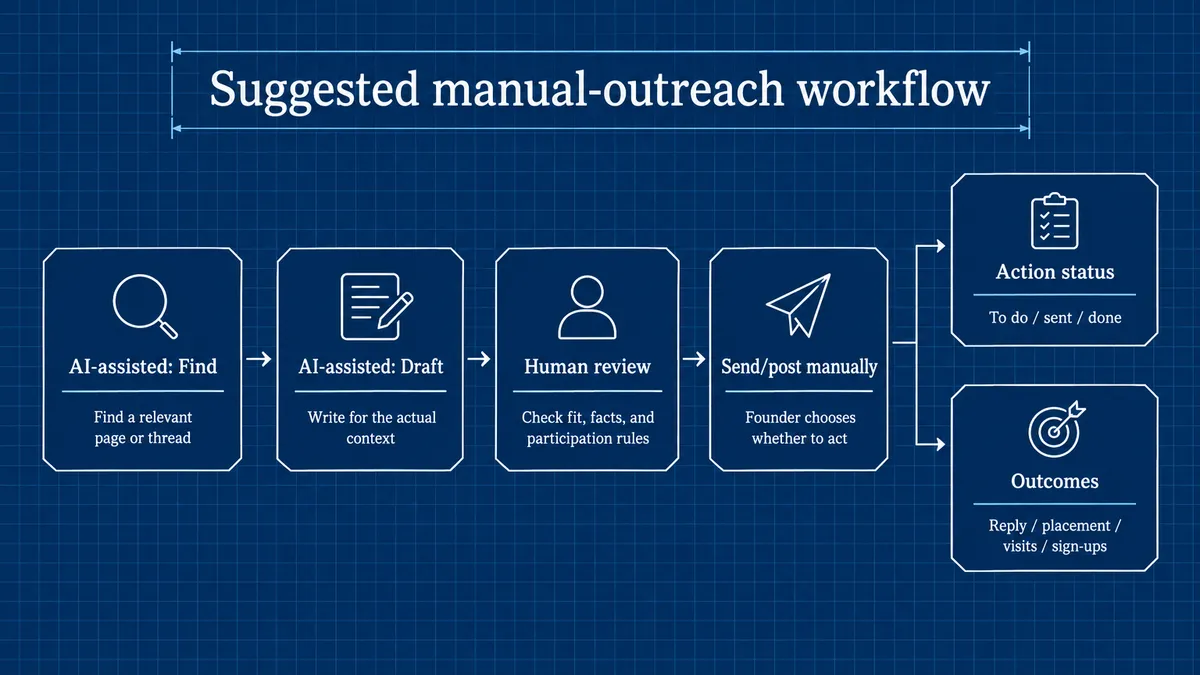
- Find a relevant page or thread. Search manually or use a discovery tool. AI can assist with finding and drafting.
- Open and check it. Confirm recency, audience fit, and participation rules. Skip it if there is no useful contribution to make.
- Draft for the actual context. Address the reader's need rather than inserting a generic pitch.
- Review, then send or post manually where appropriate. Check facts, wording, disclosure, and permission.
- Maintain two records: action status, such as to do, sent, or done; and outcomes, such as replies, placements, visits, or sign-ups.
Where a community bans AI-authored replies or self-promotion, do not use AI-written text or promote. Human approval does not override its rules. Avoid mass replies, fake accounts, paid-link promises, and repetitive unsolicited follow-ups.
For a general-purpose drafting assistant, try this template only where AI-assisted writing is allowed:
Draft a brief [email/reply] using this actual context: [excerpt]. The reader needs [need]. Include this useful non-promotional contribution: [point]. Use only this verified product fact: [fact], if relevant. Disclose that the sender makes [product]. Match this voice sample: [sample]. Do not invent familiarity, claims, quotes, or results.
Copy this blank header into a spreadsheet for outreach tracking. These are suggested ledger fields, not built-in HollerScout fields:
Opportunity URL,Why relevant,Date checked,Next action,Action status,Date sent/posted,Response,Placement/live URL,Campaign tag,Observed visits,Observed signups
Keep done, reply received, placement confirmed, and customer acquired distinct. HollerScout remembers manually marked status; its link-building scope does not include checking later for a new backlink. Verify placements manually or with a suitable separate tool.
For links under the founder's control that are allowed to be shared, use consistent utm_source, utm_medium, and utm_campaign values. Google Analytics can report tagged campaign traffic when configured. UTMs do not identify every customer or prove causation.
Choose a business next step, such as signup or purchase. Review it alongside traffic and human feedback, not just completed tasks. Supported social scheduling and subscriber-email automation can be configured separately from this manual-outreach workflow.
Suggested manual-outreach workflow: keep action status separate from outcomes. Supported social/email publishing workflows can be configured separately.
Build the smallest stack that fixes your bottleneck
Finding the first relevant conversations
With a near-zero software budget, start with manual searching, Claude Free for permitted draft work, and a spreadsheet for action status. Do not put F5Bot's personal-use Free tier into a business marketing stack.
If broader discovery research is the constraint, HollerScout is an optional $19/month specialist. If selected community intent alerts are the constraint, F5Bot Gold starts at $49.99/month plus possible token charges. Their discovery roles overlap, but coverage and cadence differ. Most founders do not need both at the outset.
Publishing useful material consistently
Use an assistant already available for writing. Add Canva's limited free AI tools only if visuals are a blocker, or Buffer's free queue if scheduling is the missing step. A release note, practical tutorial, or honest customer lesson is a better starting point than a calendar full of generic posts.
Improving what happens after a click
If there is an opted-in audience, MailerLite's free subscriber email may help without buying its AI writer. If there is website traffic, consider Clarity with suitable data and consent setup. Keep actual sign-ups or purchases in business records.
Upgrade for a concrete constraint: research burden, alert relevance, queue capacity, list size, or usage limits. Choose one bottleneck, make one change, and review actual customer progress before adding another subscription.
FAQs about AI marketing tools for indie founders
Which of these tools are free?
Claude offers a free plan with usage limits. Buffer Free includes AI Assistant and up to three channels; Canva Free includes limited AI tools. Microsoft Clarity's core behavior analytics and AI summaries are free. MailerLite Free covers up to 250 subscribers and 2,500 emails per month, but its AI writing assistant requires paid Comfort or Power. F5Bot Free is personal-use only and has no AI filtering. HollerScout has no free tier; its seven-day trial costs $3.
Can AI run a founder's marketing unattended?
Not responsibly end to end. Research and drafting can run with limited supervision, while tools such as Buffer and MailerLite can publish or send through authorized scheduling and automation. Audience choice, factual review, permission, and customer conversations remain founder responsibilities. HollerScout never sends or posts. No tool here guarantees traffic, links, sign-ups, or customers.
Do these tools track visibility in AI answers?
Do not confuse public brand mentions, website behavior, and being named in an AI answer. They are different measurements.
HollerScout describes weekly AI-search checks for up to four buyer questions in ChatGPT Search and Google AI Overviews. It does not check Perplexity, Gemini, or Claude, and it does not provide a historical visibility chart. Its purpose is to connect those checks to possible next actions, not guarantee inclusion. Using any tool on this list does not guarantee an AI Overview citation or a mention in AI answers.